Receipts to Procountor, just by printing
Print2Accounts prints any receipt on your computer screen straight into Procountor.
No paper, no scanning: receipts straight to Procountor
That Uber receipt or your Finnair tickets are already on your computer screen, but to get them into the books you first have to print them or enter them by hand. Every entrepreneur and everyone who files travel expenses knows how these pile up. At the end of the year it is a real chore to find where that one receipt went.
Print2Accounts gives your computer the same power your phone already has, only on steroids. Anything that can be printed can be sent to Procountor. It uses the latest AI models and two-way data exchange with Procountor. Getting receipts into the books is not this easy even at an accounting firm!
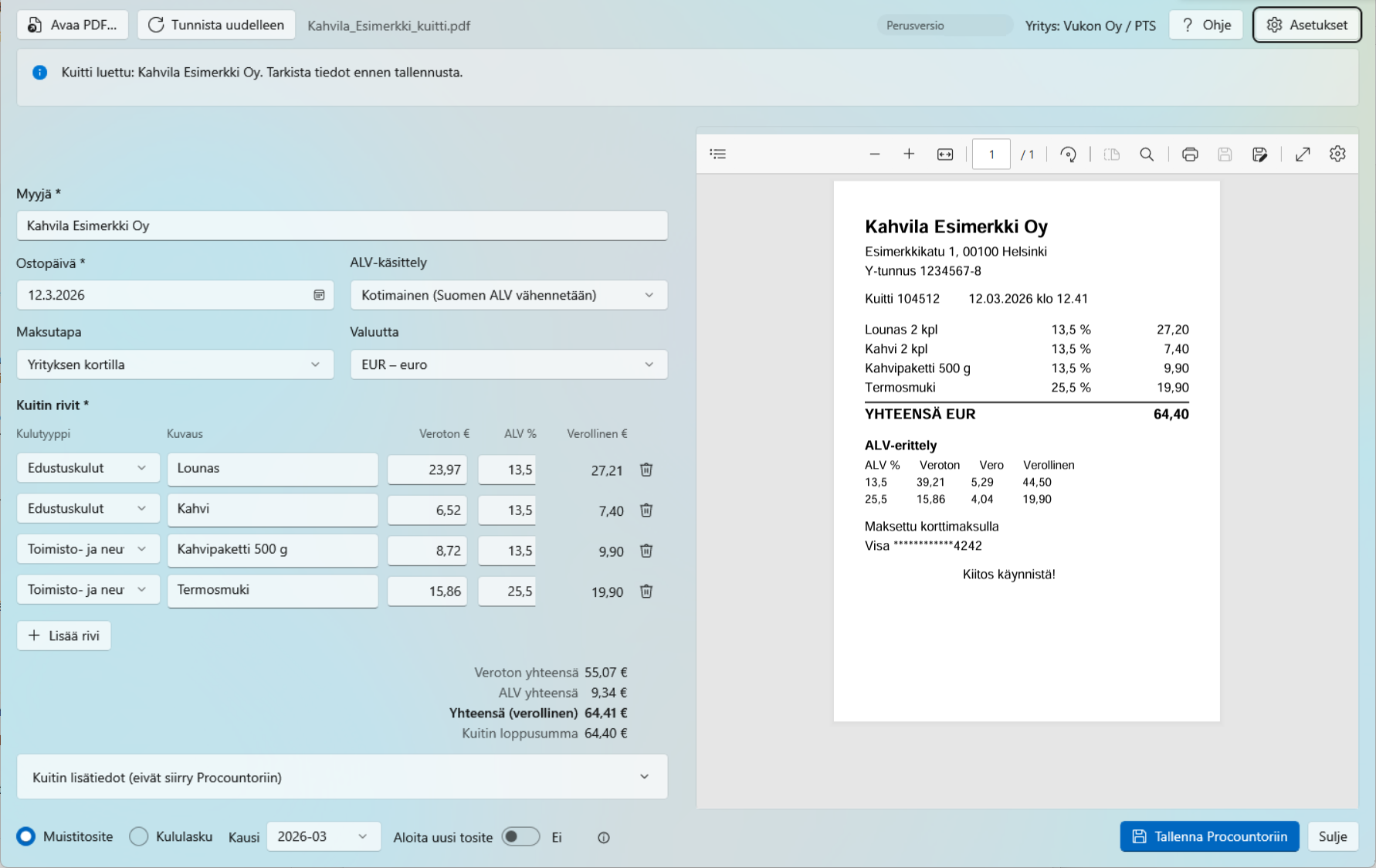
How it works
Four steps, and AI takes care of the most laborious one.
1. Printing the receipt
The receipt is opened in a browser, from an email or, for example, as a PDF and printed to the printer Print2Accounts PDF. The app opens automatically with the receipt.
2. AI recognition
The vendor, purchase date, lines, VAT rates and payment method are usually read in 10–30 seconds. Only the Procountor expense accounts selected for use are suggested as expense types.
3. Checking the details
The form and the receipt are side by side. The app checks the VAT rates against the purchase date and shows anything missing before anything is sent to Procountor.
4. Saving to Procountor
The receipt is saved to the month’s journal voucher or as an expense claim, with the PDF attached. The voucher stays unfinished, so your accountant can still edit it.
Built for Finnish bookkeeping
Print2Accounts is built around Procountor and Finnish VAT rules, not as a one-size-fits-all receipt scanner.
Correct VAT for the purchase date
The app knows the current and previous VAT rates and accepts only those in force on the purchase date. It also handles EU purchases under the reverse charge, foreign VAT and purchases from outside the EU.
Totals that match to the cent
When VAT-inclusive lines are converted to net amounts, rounding can be off by a cent. The app spreads the difference over the lines, so the booked total matches your bank charge.
Journal voucher or expense claim
Receipts paid with a company card are collected into the month’s journal voucher, which saves on Procountor’s per-voucher fees. A receipt paid with your own money becomes an expense claim.
Card recognition
The app remembers cards by their last four digits and picks the payment method and offset account by itself. The full card number is never stored.
No duplicate entries
The same receipt does not end up in Procountor twice by accident. The app remembers saved receipts and asks for confirmation before saving again.
Easy Procountor connection
You can connect with the Connect to Procountor button or with your company’s API key. VAT settings and expense accounts are fetched from Procountor automatically.
Move to another computer
Move the licence, the Procountor connection, the AI key and the settings to another computer with a transfer code that you email to yourself. The transfer is encrypted with the code and your password, so we cannot open it. When you switch computers, the old licence seat is freed, and a transfer to a colleague leaves out your personal details.
Errors show up before saving
The app sends nothing to Procountor until the required details are in order. Anything missing is shown as a clear list.
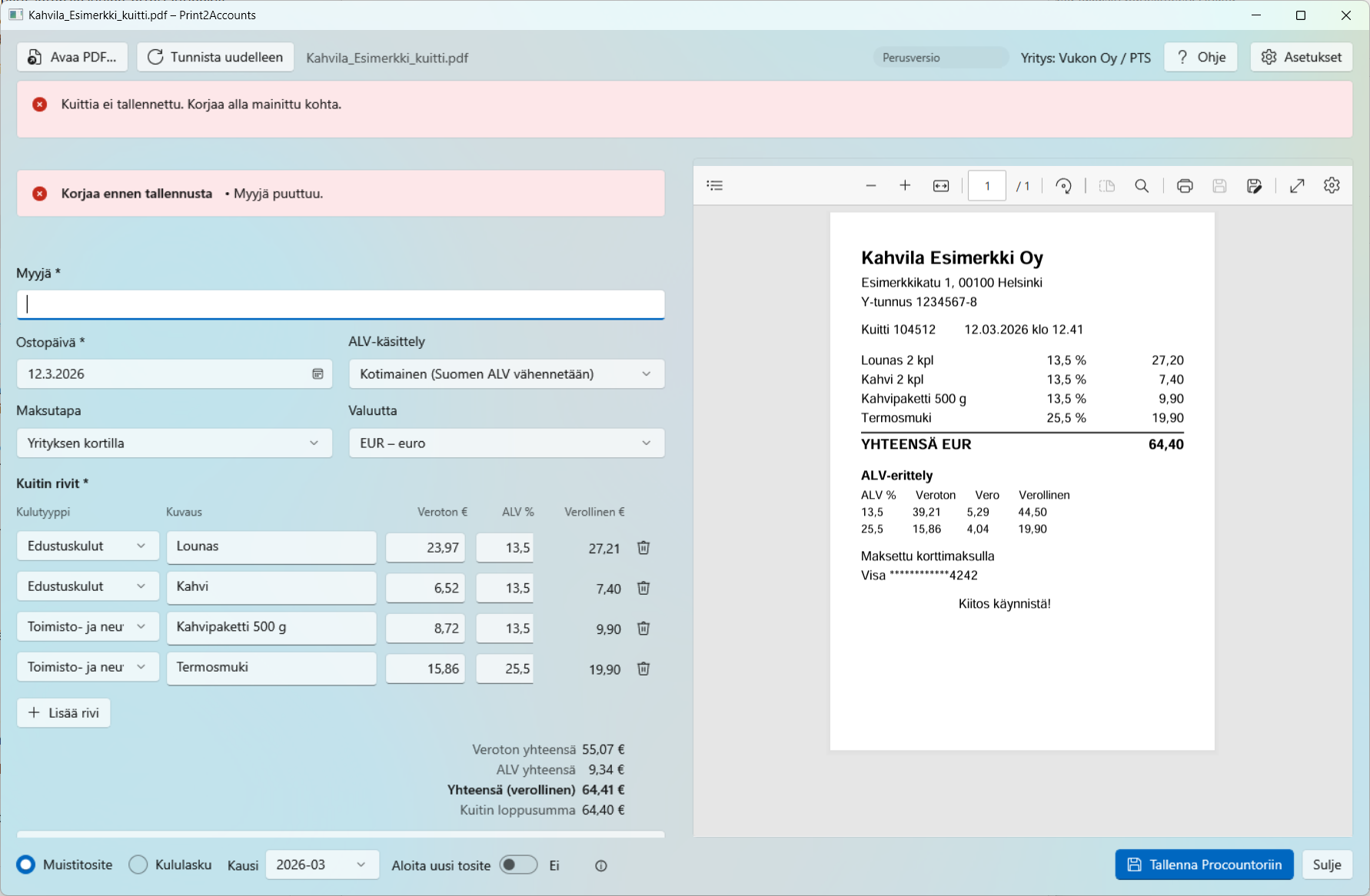
Check before saving
If the vendor, date or lines are missing, or a VAT rate was not in force on the purchase date, the app asks you to fix them first.
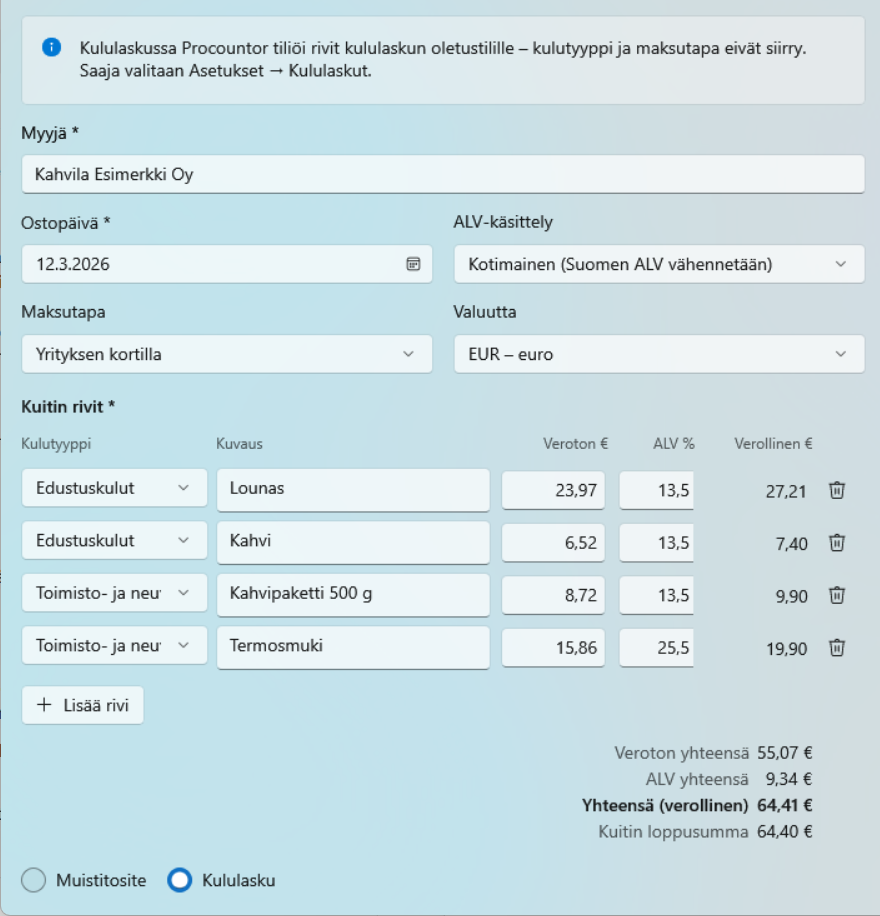
Expense claim for receipts paid with your own money
When Expense claim is selected, the receipt becomes an expense claim in Procountor that the company reimburses to the employee.
Privacy: receipts are processed in the EU
For AI recognition, the receipt PDF is sent from the computer directly to the EU region of the AI service OpenRouter, where it is read by Anthropic’s Claude model on Google Cloud servers in the EU. The receipt is not stored after processing and is not used to train AI.
Our licensing service never sees the receipt: it only counts the number of saved vouchers. In the Basic edition, the receipt goes directly to the AI service of the user’s choice with the user’s own key. The app can also be used entirely without AI.
Pricing
Start for free and upgrade as receipts pile up. The quota is counted in vouchers: one receipt saved to Procountor is one voucher. Prices exclude VAT.
Procountor’s API fees apply to all editions, including the Free edition. Finago charges a fixed fee for the Procountor API and an additional fee for each integration, such as Print2Accounts. See Finago's API pricing for details. These fees are not included in Print2Accounts prices.
Free
no licence key needed
- first 10 vouchers free
- then 2 vouchers per month
- AI recognition included
- quota per Procountor company
- Finago charges Procountor API fees separately
Most popular
AI Included
or €120 per year
- 100 vouchers per month
- AI recognition included
- no AI key of your own needed
- a licence key activates the edition
- Finago charges Procountor API fees separately
Basic
your own AI key
- 100 vouchers per month
- your own Claude or Moonshot key
- Finago charges Procountor API fees separately
For accounting firms
Accounting firms can offer Print2Accounts to their clients. Clients receive their licence key from the firm, and the app shows the firm’s name and logo. The number of vouchers is agreed separately, and billing is based on saved vouchers.
Enterprise
Lots of receipts or many users? The Enterprise edition has no monthly quota, and billing is based on the month’s voucher count. Silent installation suits IT deployment.
Set it up yourself or turnkey
Installing the app takes a few minutes. If needed, we can handle the entire set-up.
Self-service set-up
- Download the installer and run it. You need Windows 10 or 11 (64-bit) and administrator rights. For a Mac (macOS 12 or later), download the disk image (Apple silicon or Intel) and drag the app to the Applications folder.
- Accept the privacy notice on first launch.
- Connect the app to Procountor and choose the expense accounts you use.
- Print your first receipt to the printer Print2Accounts PDF. On a Mac, choose PDF ▾ → Print2Accounts in the print dialog.
We handle the setup
We install the app on the company’s computers remotely, as a silent installation through IT deployment if needed. We connect it to Procountor, go through the expense accounts and the offset accounts of the payment methods with the client or their accountant, and make sure the first receipts go in correctly.
We bill the time spent at our normal hourly rate.
User guide and frequently asked questions
The user guide takes you from installation to your first saved receipt. The FAQ covers editions, VAT, privacy and troubleshooting.
Is a separate AI key needed?
Only in the Basic edition. In the other editions, AI is included in the app and no separate key is needed.
What happens when I run out of vouchers?
New receipts cannot be saved to Procountor until the start of the next month. The unlimited Enterprise edition is also available.
Can the app be used for several companies?
For now, this is only possible in the edition for accounting firms.
Does the app work without AI?
Yes. If manual entry is chosen in the privacy notice, receipts are saved to Procountor with their attachments in the same way.
Try your first 10 receipts for free
Print2Accounts is developed by Vukon Oy. The program is distributed and maintained technically through the Vesan.AI website. For questions or a turnkey set-up, please get in touch.