
Fiddling with receipts is part of everyday life for every business owner and anyone who files travel expenses, and not a pleasant part. Paper receipts have already got easier: you can snap a receipt with your phone straight into Procountor or eTasku – and the app usually reads the details almost completely for you.
Then there is the other lot. The Finnair flight ticket, the receipt for your Adobe software, online store orders, the hotel invoice. They are already digital and already on your computer screen, the device you use for all your other paperwork anyway. Yet these are exactly the ones that are hardest to get into the books.
There are as many workarounds as there are people. Some print the receipt on paper and photograph it with their phone. Some photograph the screen and zoom in until the totals are legible. Some first print the receipt to PDF, email it to eTasku and assign the accounts by hand later. Many send everything straight to their accountant and let them sort out the rest. The bravest open Procountor and type in the details themselves. And usually some receipts never get dealt with, because right now there is no time.
Why is a receipt that is already digital harder to deal with than a crumpled slip of paper?
On a phone, the app does two jobs at once, at least sometimes
Getting a receipt into the books is really two separate jobs. First, the receipt has to be saved as a file that is attached to the voucher. Then its details have to get into the books: vendor, date, amounts and VAT.
On a phone, the camera turns the receipt into a standard file – a photo. The app then reads the details from the photo using AI. As a medium, a paper receipt is always the same kind of slip, so photographing, scanning and interpreting it with AI is in principle always the same process. But lighting, camera quality and the content of the receipt vary, and the AI model in the camera app may not be very good either, which is why you often end up filling in the details yourself anyway.
A receipt on your screen lives inside some program: a browser, an email, a PDF reader or a web service’s account page. One service offers a PDF download, another shows the receipt as a plain web page, a third sends it as the text of an email. Just saving the file takes extra steps: print to PDF, save, attach to an email, send. And once the receipt finally arrives, the accounts still have to be assigned by hand.
Your browser, email and PDF reader share one button
All of these have one thing in common: you can almost always print the receipt. The Print button works the same way in a browser, an email program and a PDF reader.
A printer does not have to be a physical device. Many people already have various PDF printers on their computer, such as Microsoft Print to PDF or Adobe PDF. If a printer like that sent the file straight into your accounts, any receipt you can print could get there the same way.
The printer is your computer’s camera. When AI then reads the receipt and assigns the accounts, both jobs are done in one go. And on a computer, it can be done with better AI models and in perfect “shooting conditions”.
We built it for ourselves first
In an IT company, a large share of purchases is made online: software subscriptions, cloud services, licences, domain names, flights. Almost all of our receipts are on a screen.
There are receipt apps for phones, but there was nothing like it for computers. So we wrote a program for ourselves that gets computer receipts into the books at least as easily as a phone handles paper ones. When an entrepreneur friend of ours and our accounting firm saw how it works, they asked to have the same program for their own use. That is where the idea took off.
The result is Print2Accounts: a small Windows app that changes how you handle receipts for good. Anyone who buys something for a company and gets the receipt on their computer benefits from it. With it, you print any receipt straight into Procountor. Really.
Print, glance, save
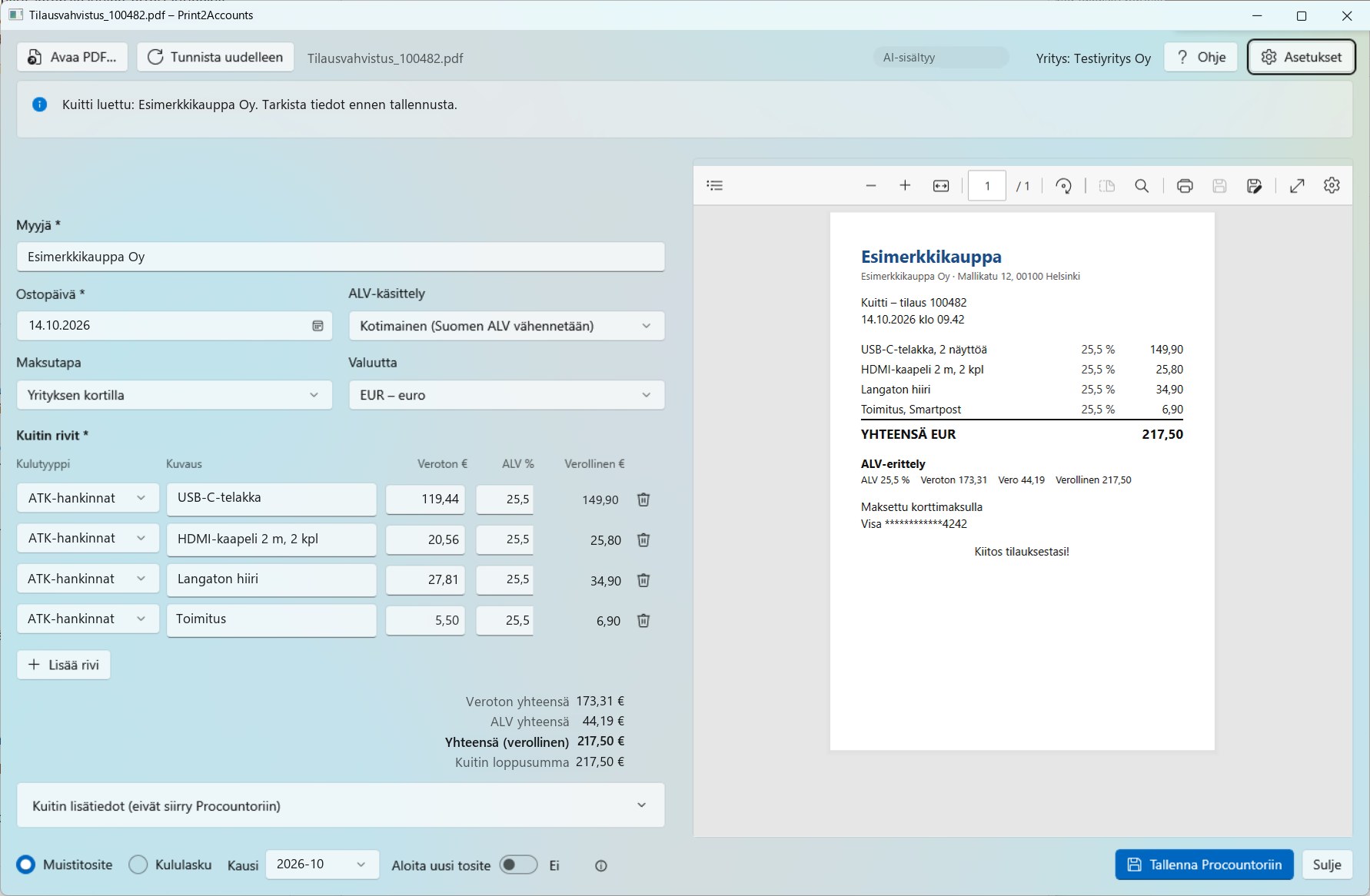
Installing the app adds a printer called Print2Accounts PDF. From then on, you print a receipt like any other document, and the rest takes care of itself:
- You print the receipt to the Print2Accounts PDF printer from your browser, email or a PDF file. The app opens by itself with the receipt. No files to save and no emails to send in between.
- AI reads the receipt and assigns the accounts automatically, usually in 10–30 seconds: vendor, purchase date, lines, VAT rates, payment method, and expense accounts from those you have selected in the app’s settings. If your accountant wants the vouchers always posted to, say, a suspense account, that works too.
- You glance over the details. The form is on the left and the receipt on the right. If the AI was unsure about something, it tells you clearly. It is almost always smarter than you would think.
- You click Save, and the receipt is in Procountor. A receipt paid with a company card goes into the month’s shared journal voucher, and one paid with your own money becomes an expense claim that the company reimburses to you. The receipt PDF is attached. Thanks to the shared journal voucher, Procountor charges for only one voucher for the month’s card receipts.
The saved voucher stays unfinished in Procountor, so your accountant can still edit its lines and attachments if they wish.
The finer points of Finnish bookkeeping are already handled
When you type receipts in by hand, the time goes on the details. Which VAT rate was in force on the purchase date? How do you book an invoice from an Irish software company with no VAT on it, or a service paid in dollars?
Print2Accounts knows the current and previous VAT rates and accepts only those in force on the purchase date. Foreign receipts have ready-made options: EU purchase under the reverse charge, foreign VAT, and purchase from outside the EU. The AI suggests the right one, and you check it. Amounts in other currencies are converted to euros automatically at Procountor’s rate for the receipt date.
The app remembers the cards you use by their last four digits and picks the payment method by itself. If you try to save the same receipt again, it warns you.
What you need and what it costs
Print2Accounts runs on 64-bit Windows 10 and 11 and saves to Procountor. A macOS version for Apple computers is on its way. The first time, you connect the app to your company’s Procountor: you log in, choose the company and approve the integration. If you do not have the right to approve integrations, your company’s Procountor administrator can create an API key for the app.
With the free edition, you can save your first 10 receipts at no cost and two receipts a month after that. The free edition is meant for trying out the app, but it also works well for light use. The other editions and their prices are on the Print2Accounts page. The app also works without AI, and even then it speeds up receipt handling considerably.
Procountor adds a cost of its own in every edition, including the free one: Finago charges for the API according to its price list – a fixed fee plus an additional fee for each active integration. This is not included in the Print2Accounts price, and unfortunately we cannot influence these prices. In return, we have priced the app so affordably that the total cost stays reasonable – especially if you already use the API for something else.
The AI reads the receipt using Anthropic’s Claude model on servers located in the EU. The receipt is not stored after processing and is not used to train AI.
The next time your accountant asks for receipts
Paper receipts got their shortcut into the books through the phone camera years ago. Receipts on your screen now get theirs through the printer.
The next time your accountant asks for missing receipts, you may not even need to dig the dreaded stragglers out of your inbox and online account pages. And if you do, just print them straight into your books.
Download the free edition of Print2Accounts and try it on the first receipt waiting in your inbox.